SIMS v2t — Video & Audio to Text
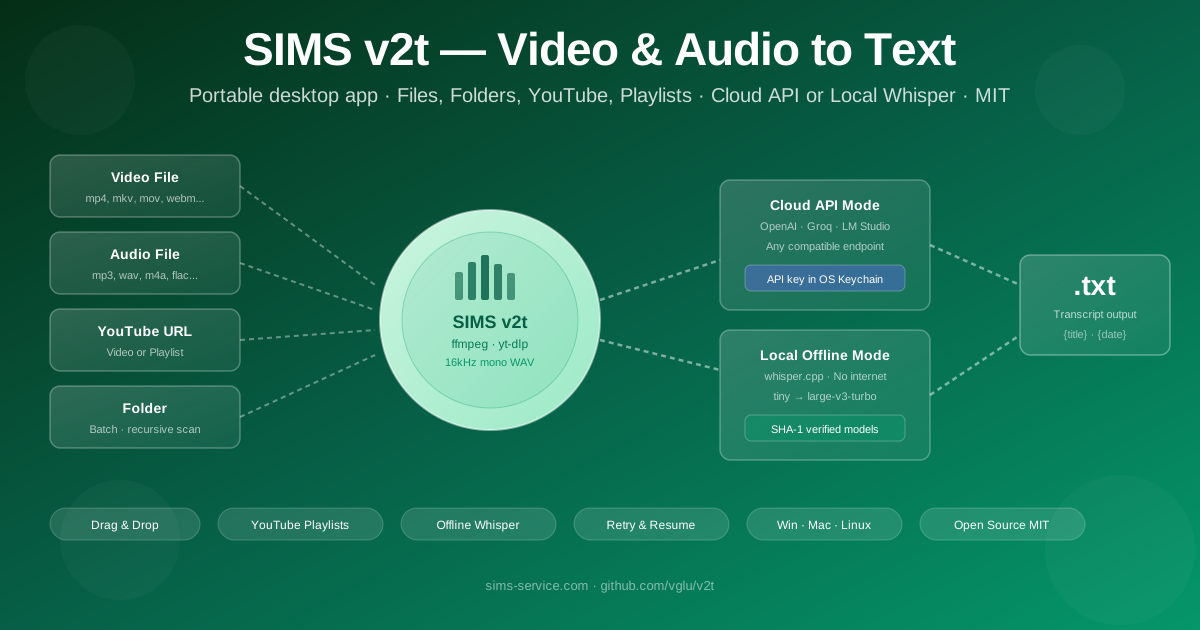
Portable desktop app that converts video, audio, and YouTube URLs into text transcripts. Drag-and-drop files or paste links — get a .txt in seconds. Supports local offline transcription via whisper.cpp (no cloud key needed), one-click tool downloads, batch folder processing, and YouTube playlist support. Windows, macOS, Linux. Open Source MIT.
SIMS v2t: Portable Video & Audio to Text on Your Desktop
Transcribing video content is a constant bottleneck. Researchers pause and replay interviews. Journalists manually type quotes from recordings. Content creators copy subtitles line by line. Teams wait for cloud services to process meeting recordings — and then discover the service requires an account, a subscription, or a monthly limit.
The Challenge
Getting text from video shouldn't require a cloud account, a browser extension, uploading sensitive recordings to a third party, or learning a command line. SIMS v2t puts transcription on your desktop: drag a file or paste a YouTube link, press Start, get a text file. Works offline. No account required.
The Solution: SIMS v2t
SIMS v2t is a portable desktop application built on Tauri 2 (Rust backend + React frontend). It runs on Windows, macOS, and Linux. Drop it in a folder — no installer, no system dependencies, no admin rights needed. Point it at a video file, an audio recording, a folder of media, or a YouTube URL (including playlists), and it produces a plain .txt transcript in the output folder you choose.
Transcription happens either through a configurable HTTP API (OpenAI-compatible — works with OpenAI Whisper, Groq, local LM Studio, and any compatible endpoint) or entirely offline via whisper.cpp — a local CLI that runs the Whisper model on your machine with no internet connection required.
How It Works
- Add sources — drag & drop files, pick files or a folder, or paste YouTube/playlist URLs
- Configure once — set output folder, transcription mode (cloud API or local), and model
- Start — queue processes sequentially with real-time progress and logs
- Get text —
.txtfiles appear in your output folder with predictable filenames
Video file / Audio file
YouTube URL / Playlist     →  [ffmpeg normalize]  →  [Whisper API / local CLI]  →  .txt
Folder of media files
Key Capabilities
Drag & Drop Queue
Drop files directly onto the app. Paste YouTube URLs (single video or full playlist). Add entire folders — recursive scan finds all supported media formats automatically. Sequential queue with per-job status and log output.
YouTube & Playlist Support
Paste any YouTube link — single video or playlist. yt-dlp extracts audio automatically. A playlist produces one transcript per video. Optionally save the original video file to your output folder alongside the transcript.
Cloud API Mode
Connect to any OpenAI-compatible transcription endpoint — OpenAI Whisper API, Groq, local LM Studio, or self-hosted services. API key stored in OS credential store (Windows Credential Manager, macOS Keychain) — never in plain text files.
Local Offline Mode
Switch to whisper.cpp CLI for fully offline transcription. Choose from tiny, base, small, medium, or large-v3-turbo models. Models download on first use with SHA-1 verification. After download — works with no internet connection at all.
One-Click Tool Setup
ffmpeg and yt-dlp download automatically on Windows and macOS with one button click — no manual installation. whisper-cli detected via Homebrew on macOS or downloaded on Windows from the official whisper.cpp release. Download progress shown in real time.
Retry & Resume
HTTP API requests automatically retry on 429 / 5xx errors with exponential backoff. Large files split into chunks — each chunk checkpointed. If a job is interrupted, it resumes from the last completed chunk — not from scratch.
Supported Formats
| Category | Formats |
|---|---|
| Video | mp4, mkv, mov, webm, avi, wmv, m4v |
| Audio | mp3, wav, m4a, flac, ogg, opus, aac, wma |
| URLs | YouTube videos, YouTube playlists, any yt-dlp-supported URL |
| Output | Plain text .txt with configurable filename template |
Transcription Modes
☁️ Cloud API Mode
- ✅OpenAI Whisper API — industry-standard quality
- ✅Groq — ultra-fast inference
- ✅Local LM Studio — private cloud on your machine
- ✅Any compatible endpoint — configurable base URL
- ✅Files > 22 MB auto-split into 8-minute chunks and reassembled
- ✅API key in OS keychain — not in config files
🖥️ Local Offline Mode
- ✅No internet required after model download
- ✅No API key — fully free to run indefinitely
- ✅Models: tiny (75 MB) → large-v3-turbo (1.5 GB)
- ✅SHA-1 verified model files from official Hugging Face repository
- ✅Real-time progress from whisper.cpp stderr output
- ✅Same chunking logic as cloud mode for large files
💼 Use Cases
🎓 Researchers & Academics
Transcribe hours of interview recordings in a single batch run. Add a folder of audio files — get a folder of transcripts. Fully offline — no need to upload sensitive interview data to cloud services.
📰 Journalists & Content Creators
Paste a YouTube link and get a transcript in minutes. Transcribe podcast episodes, interview recordings, or conference talks. Use the transcript as a draft for articles, show notes, or subtitles.
💼 Business & Teams
Transcribe meeting recordings, webinars, and training videos. Process a folder of recordings from a conference day in one go. Keep sensitive call recordings local — no cloud upload required in offline mode.
🛠️ Developers & IT Teams
Self-host a Whisper-compatible API and point v2t at it. Process bulk media libraries in batch. Portable — runs from a USB drive or shared network folder with no installation on target machines.
📚 Education
Transcribe lecture recordings for students. Download YouTube educational playlists and produce a text corpus for study. Works on classroom machines without admin rights — fully portable.
🔒 Privacy-Sensitive Workflows
Legal, medical, or HR recordings that cannot leave the organization. Switch to local whisper.cpp mode — all processing happens on the machine, nothing is transmitted externally. Full control over model and data.
🔐 Security & Privacy
Designed for Privacy
- ✅ OS Credential Store: API key stored in Windows Credential Manager or macOS Keychain — never written to disk in plaintext
- ✅ Offline mode available: Local whisper.cpp processes audio entirely on your machine — no data leaves your computer
- ✅ No telemetry: The application sends no usage data anywhere
- ✅ Process isolation: External tools (ffmpeg, yt-dlp, whisper-cli) are called with explicit arguments — no shell injection possible from user input
- ✅ SHA-1 verified models: Whisper model files verified against official catalog checksums before use
⚡ Quick Start
Get Running in 3 Minutes
- 1. Download the installer or portable ZIP from GitHub Releases
- 2. Launch — the Setup Guide walks you through the first-time configuration
- 3. Click Download Tools to get ffmpeg + yt-dlp automatically (Windows/macOS)
- 4. Choose transcription mode: paste an API key for cloud, or download a whisper model for offline
- 5. Drag a video file or paste a YouTube URL → click Start → get your .txt
Whisper Models
| Model | Size | Speed | Quality | Best for |
|---|---|---|---|---|
| tiny | 75 MB | Fastest | Basic | Quick drafts, clear speech |
| base | 142 MB | Fast | Good | Everyday use |
| small | 466 MB | Medium | Very good | Recommended for most users |
| medium | 1.5 GB | Slower | Excellent | Accented speech, technical content |
| large-v3-turbo | 1.5 GB | Medium | Best | Maximum accuracy |
All models downloaded automatically from the official Hugging Face repository (ggerganov/whisper.cpp) with SHA-1 integrity verification.
🛠️ Technical Stack
Core Technologies
- 🦀 Rust + Tauri 2 — native desktop backend, cross-platform
- ⚛️ React 19 + TypeScript — responsive UI
- ⚡ Vite 7 — fast frontend tooling
- 🔗 Tokio — async Rust runtime with cancellation tokens
External Tools
- 🎬 ffmpeg — audio normalization (16 kHz mono WAV)
- 📥 yt-dlp — YouTube and URL audio extraction
- 🎙️ whisper.cpp CLI — local offline transcription (optional)
- 🔑 OS keyring — secure API key storage
❓ Frequently Asked Questions
Do I need to install ffmpeg and yt-dlp manually?
apt install ffmpeg yt-dlp) or point to existing binaries in Settings. You can also place the binaries next to the application executable — v2t finds them automatically.
Can I use it without an internet connection?
What happens with large files over the API size limit?
What languages are supported?
uk, de, fr) in Settings — or leave it empty for automatic language detection.
Is it truly portable — can I run it from a USB drive?
bin/ subfolder). v2t detects them automatically. Settings are stored in the OS standard app config directory so they persist between runs. No registry entries, no system-wide installation required.
Can I transcribe an entire YouTube playlist?
.txt file per video. All files are placed in your configured output folder with names derived from the video titles.
Where is my API key stored?
📞 Contact & Support
- GitHub: github.com/vglu/v2t — issues, feature requests, source code
- Email: vhlu@sims-service.com
Open Source — MIT License
SIMS v2t is free, open-source software by SIMS Tech. Source code, releases, and contributions: github.com/vglu/v2t.
🔗 Resources
GitHub Repository
Explore the complete source code, documentation, and latest releases on GitHub.
View on GitHub